
Session Replay AI Report
Zuko AI will analyse your session recordings and generate a report showing you why people dropped off your form and what you can do about it
One of the issues with using session replay tools is the time it takes to sift through recordings to actually find a relevant user issue.
Zuko has always had sophisticated filtering tools to allow you to narrow down the sessions to ones where a user is struggling but you'd still have to watch the sessions to find the problems that were costing you customers.
That's why we built a new AI tool that "watches" the sessions to understand what happened in them and generates a summary of the main UX issues and what you can do about them.
The report is run on a monthly basis (looking at the previous calendar month) and gives you:
- A quick summary of the biggest issues
- A full analysis of the reasons for abandonment at your two biggest drop-off points (based on Zuko data)
- Suggested improvements that you can test to fix the issues identified
- A list of other form friction points that the AI observed were affecting the user journey
- Links to recordings that illustrate the particular issue
If you are signed up to a session replay subscription then you can find this report in three places:
The Session Replay page
The quick summary section of the report appears above the sessions section. From there you can click through to a more detailed version of the report.
[ADD SCREENSHOT]
A Saved Reports section
This section will show you the detailed version of your monthly report and also allow you to access any historic reports that you have,
[ADD SCREENSHOT]
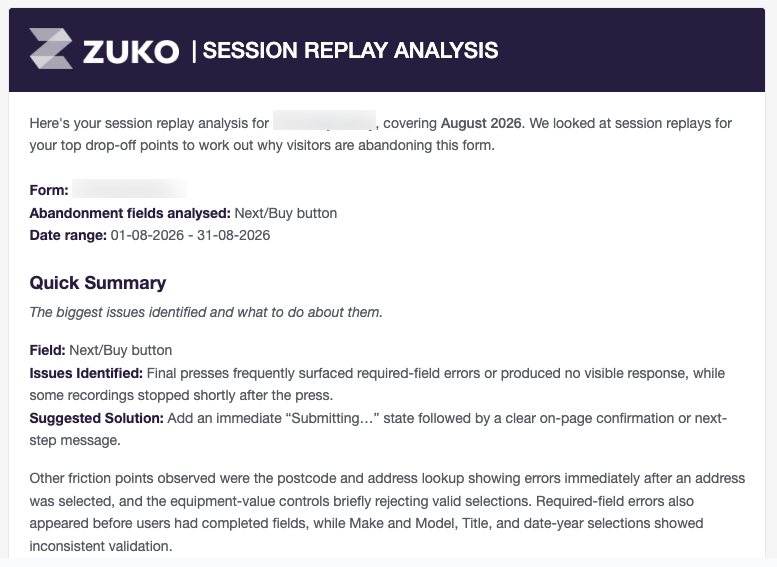
A Monthly Email
If you are signed up to receive regular reports from Zuko you will be sent an email version of the monthly report at the start of every month. If you are not recieving one then please check your spam box or contact us to check that it has been sent.
Note that the report is based on looking at 100 sessions for each of the top two abandonment points. If you want a custom report with higher volumes or looking at a diffent field then contact us using support@zuko.io
If your form does not have any fields with an abandonment count of over 50 then a monthly report will not be generated as there is not sufficient data to provide an accurate analysis.
Want to get started with Zuko?
Start a free trial that includes all features, or request a demo