
Agent Experience Optimization (AXO): What It Is and Why It Matters
An overview of UX for AI agents and why you need to pay attention to it
An overview of UX for AI agents and why you need to pay attention to it
For the past couple of decades, businesses have optimized their websites for two audiences: humans and search engines.
Two new marketing disciplines grew up over the same period. Search Engine Optimization (SEO) to help people find your content and Conversion Rate Optimization (CRO) to create a smooth journey to guide people to a desired action once they arrive.
But a new, robotic audience is emerging. AI agents are now able to interact autonomously with websites to complete tasks such as comparing prices for flights or buying mobile phones at the cheapest prices.
The use of these types of agents is growing fast. Salesforce tracked a growth in usage of 119% in the first half of 2025 and BCG project a 45% annual growth rate for the AI Agent market over the next 5 years.
As these agents become more capable and more widely used, a new discipline is beginning to emerge to improve websites for the agentic audience. It’s being called Agent Experience Optimization ( or AXO for short).
What is Agent Experience Optimization?
Agent Experience Optimization (AXO) is the practice of designing digital experiences that AI agents can understand, navigate, and interact with effectively.
Just as CRO and UX focus on helping humans use on your website, AXO focuses on helping AI agents successfully complete tasks across digital properties.
This doesn't mean building websites specifically for machines. Instead, it means creating experiences that are structured, accessible, and understandable enough that both humans and AI systems can use them successfully.
The organizations that adapt early may gain a significant advantage as AI-driven traffic and interactions become more common. If a site, form or checkout is unusable for AI agents then it will essentially be rejecting business from that channel and losing out Vs competitors.
What Makes an Experience "Agent-Friendly"?
AI agents don't experience websites in the same way humans do. Humans rely on visual design, intuition, context, and emotional cues. We can often figure out what a website wants us to do, even when the experience isn't perfect.
Our robotic friends are different. They rely heavily on structure, clarity, consistency, and machine-readable information to progress. The technology is getting more intuitive and is starting to overcome some of these issues, but every time an agent has to think slows down the process making it less likely that it will accomplish the required task.
Some common barriers we’ve seen include:
- Ambiguous navigation
- Poor information architecture
- Inconsistent terminology
- Hidden content
- Complex multi-step processes
- Unclear validation rules
- Dynamic interfaces without clear context
- Accessibility issues
Many of these problems already create friction for human users but AI agents simply expose them more clearly.
A couple of examples illustrate this dynamic:
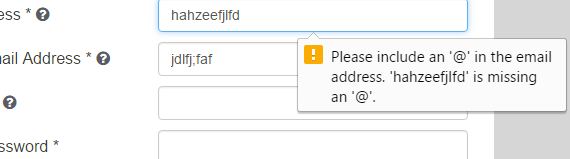
Firstly, we’re not fans of native browser validation for form error messages in most cases but at least they do give humans some level of guidance at a point of high friction.
However, as these messages are not contained within the DOM of the web page, many AI agents won’t natively ‘see’ them so will not instinctively be able to correct the issue and may end up in a doom loop as they try to interpret what to do next.
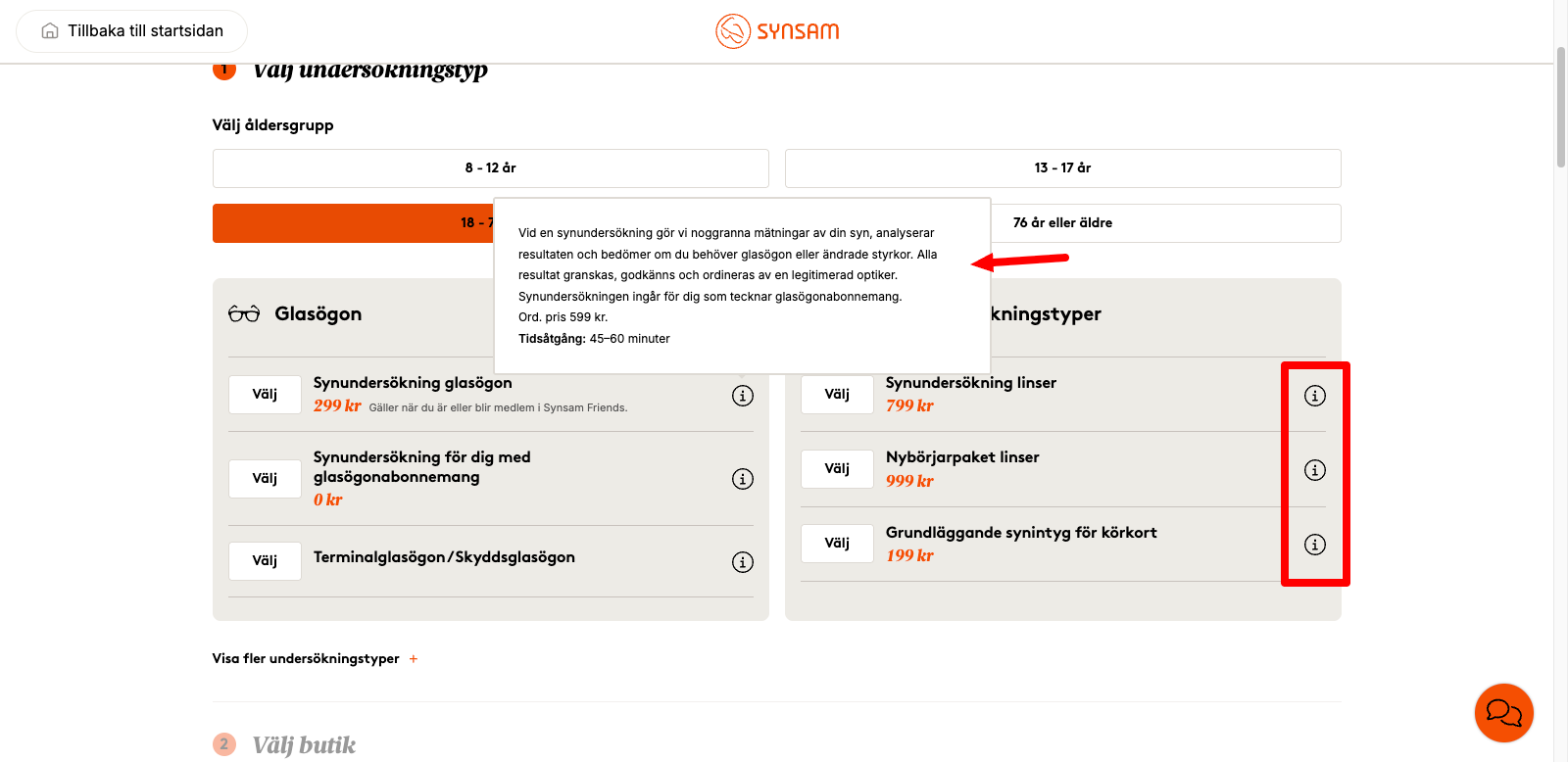
Similarly, tooltips are not great for human users, especially on mobile devices - people regularly miss them so don’t read the important information hidden behind them. AI agents are even less likely to mouse-over or click on the tooltip meaning that the information is as good as useless for them.
If something is important enough to the user journey it should be there for all (humans and agents) to read, not hidden behind a few tiny pixels.
The Connection Between AXO and Accessibility
One of the most interesting aspects of AXO is how closely it aligns with accessibility best practices.
Accessible websites tend to use clear page structures, include meaningful labels and follow consistent navigation patterns. They also provide helpful descriptive content, support, keyboard navigation and use semantic HTML.
These same characteristics help AI agents understand and interact with digital experiences. In most cases, improving accessibility can simultaneously improve the experience for users, search engines, and AI agents. It’s a win win win!
Rather than creating an entirely new set of requirements, AXO often rewards organizations that already prioritize clarity and usability for their customers.
AXO Extends Beyond Content
Much of the early discussion around AXO focused on content discoverability:
- Can AI systems understand your expertise?
- Are your pages structured appropriately?
- Does your content answer user questions clearly?
These are important considerations but the real challenge begins when an AI agent attempts to move beyond reading and starts interacting.
In order to have a usable site for AI agents you need to make sure they can navigate and interact successfully so they can accomplish the main goal of the site. Can they:
- Navigate your product catalogue?
- Configure a solution?
- Compare pricing options?
- Book a meeting?
- Create an account?
- Complete a purchase?
- Submit a lead form?
If you test this path you’ll often reveal weaknesses in digital experiences that have gone unnoticed for years. There are a number of tools that can help you test this.
Why Forms Matter in AXO
Forms represent one of the clearest examples of AXO in practice. A website might attract traffic, communicate value, and persuade a potential customer to engage. But if the final step involves a form that creates friction, the journey breaks down.
We’ve put together a more in-depth guide on where AI agents may struggle and how you should be optimizing forms & checkouts for them but as your starter for ten, AI agents may struggle with:
- Ambiguous field labels
- Hidden validation requirements
- Poor error messaging
- Multi-step workflows
- CAPTCHAs
- Dynamic fields that appear unexpectedly
All these issues and more can reduce completion rates, create abandoned journeys, and prevent successful outcomes.
As AI agents become more involved in lead generation, purchasing, onboarding, and support interactions, understanding how they interact with forms will become critical.
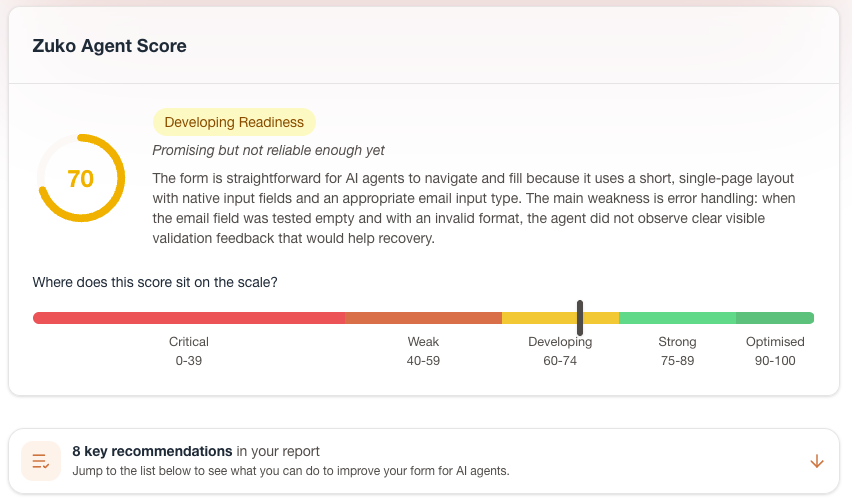
If you’re not sure how ready your form or checkout is to receive business from AI agents, Zuko has created Agent Score, an audit tool that can show you how easy it is for agents to complete your form and identify any issues with accessibility, navigation, error handling, data and output.
How Organizations Can Prepare for AXO
The future of AI-driven interaction is still evolving, but there are practical steps businesses can take today. The headlines are:
1. Improve Information Architecture
Make it easy to understand how your site is organized. Clear hierarchies benefit humans, search engines, and AI agents alike.
AI agents need to build a mental model of your website before they can complete tasks successfully. If products, services, resources, pricing information, or key actions are buried beneath confusing navigation structures, both users and agents will struggle to find what they need.
2. Prioritize Structured Content
Use headings, schema markup, consistent terminology, and semantic HTML wherever possible.
3. Reduce Unnecessary Complexity
Simpler experiences are easier for everyone to navigate. Every additional step introduces friction so audit whether you really need that extra form question or funnel stage.
4. Invest in Accessibility
Accessibility improvements often translate directly into better machine understanding and they also keep you ahead of the regulatory game..
5. Make Interactions Explicit
Whether it's navigation, pricing, onboarding, or forms, clarity beats cleverness. Tell the user explicitly and unambiguously what they need to do. Don’t make them guess.
6. Measure Real User Behaviour
Understanding where users struggle remains one of the most valuable sources of optimization insight and this remains the same whether you are talking about humans or agents. There are a number of tools that can help you in your AXO journey. As well as the Zuko Agent Score we’ve previously mentioned, we’ve collated a list of some of the AXO tools you might want to consider.
As AI agents become a larger part of the digital landscape, Agent Experience Optimization will become as fundamental to digital strategy as SEO and CRO are today, but the good news is that the same qualities that help an AI agent understand your website are often the same qualities that create better experiences for human users.
About the Author
Alun Lucas
Managing Director, Zuko Analytics
Alun Lucas is Managing Director of Zuko Analytics, a specialist form analytics and session replay platform. He writes about form optimisation, conversion, digital analytics and emerging AI-agent behaviour.
LinkedIn ProfileWe wrote the book on form optimization!
"The best book on form design ever written - 80 pages of PURE GOLD"

More from our blog:




Want to get started with Zuko?
Start a free trial that includes all features, or request a demo